|
|
Pre- and Post-Processing
 What external tools are
available for pre-processing Cart3D
triangulations?
Post processing Options?
Force and Moment
Extraction using CLiC
On-the-fly
component-based force and moment extraction
Point and line
"sensors" for data collection
What about CGNS?
What external tools
are available for pre-processing Cart3D
triangulations?
File Import Tools:
Cart3D comes with several tools for for
importing data. Most of these are documented on the
Surface Modeling pages. These tools allow you to
import geometry from STL, DXF, OFF, FNF
triangulations, or from structured surface meshes in
LaWGS or Plot3D format. Using these tools you can
easily convert your input geometry into Cart3D as a
single
component, configuration,
or a final
wetted
surface. In addition to those distributed with
the package, other geometry import tools are
available through the
discussion group.
Native
Triangulations:
A number of packages can write Cart3D
triangulations natively, these include (among
others) Pointwise,
OpenVSP,
ESP/OpenCSM,
Tecplot. We
also have plugins for the popular Blender
animation and modeling package, Contact us if you're
interested in this. In addition to the plugins and
native support in existing packages, an open source
software library is available through the NASA software
catalog for natively reading and writing
Cart3D triangulations which you can link to from any
source code package.
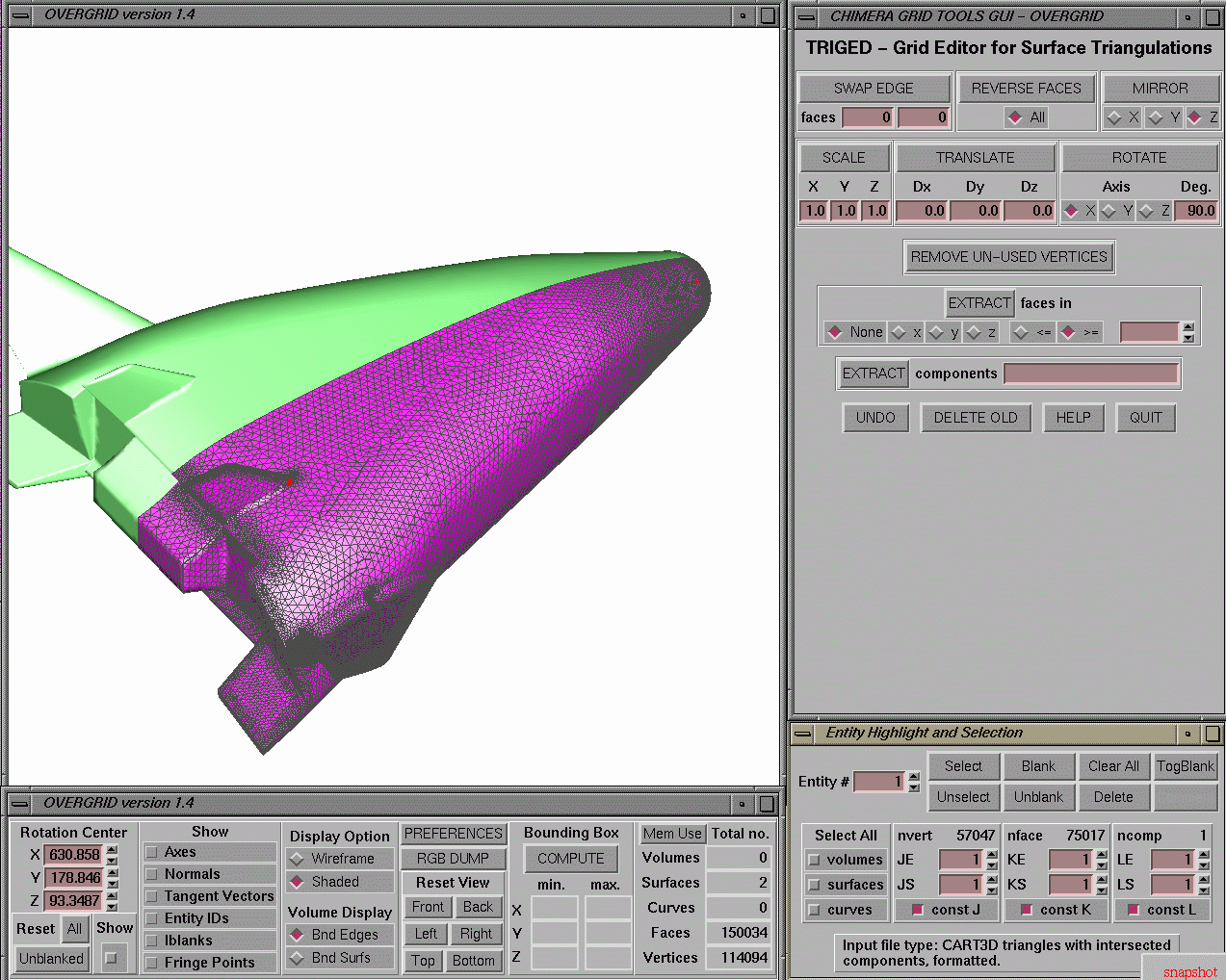
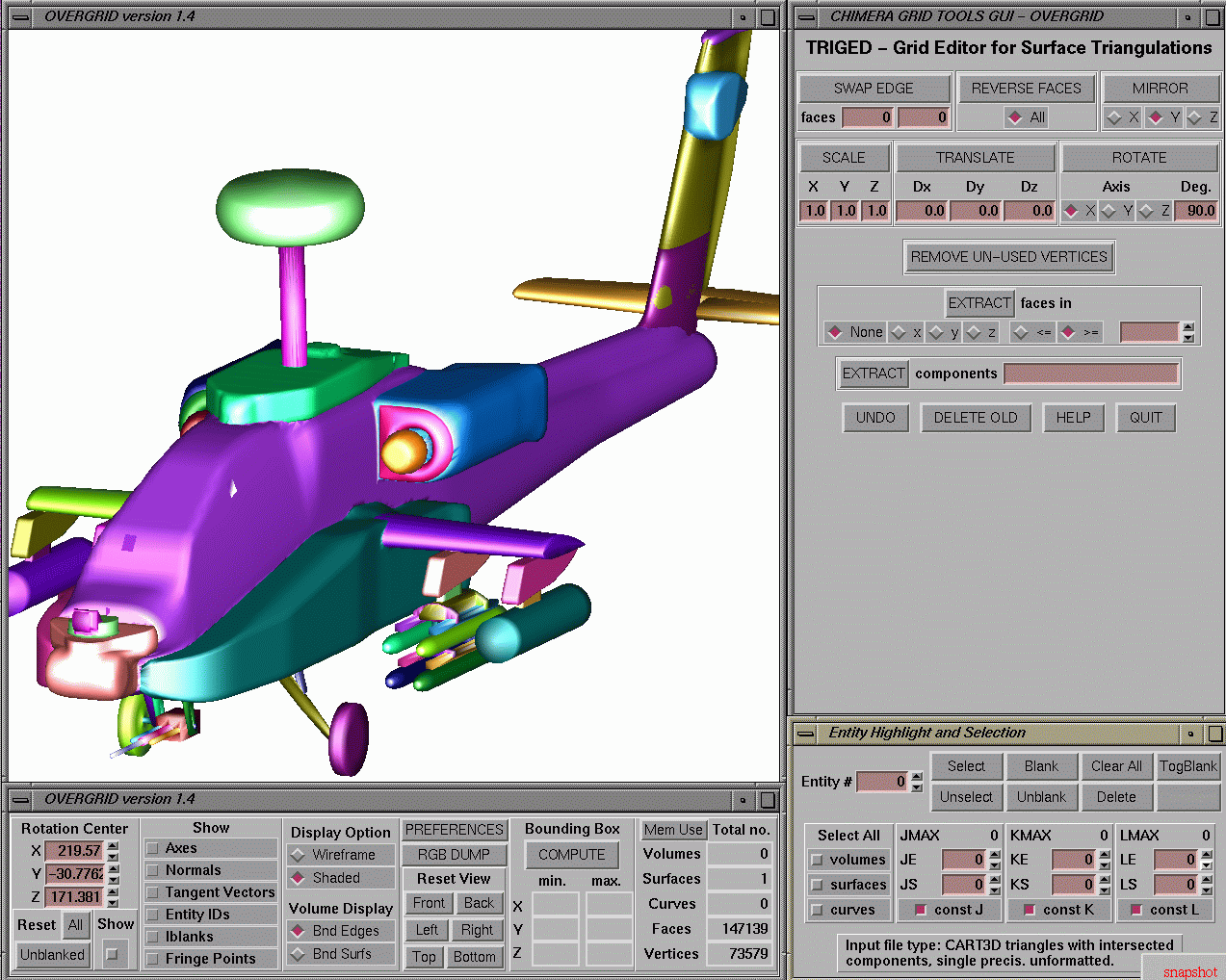
Overgrid:
But what about actually viewing and
manipulating these components? Fortunately,
several users and collaborators have developed
tools to allow you to do this. Of those that have
found their way back to us, William Chan's
Overgrid package is one of the best and the most
accessible. Overgrid is actually part of
NASA's Chimera Grid Tools CGT) package, but thanks
to a happy collaboration with the CGT team, the
software can read, manipulate and write Cart3D single
component, configuration,
or wetted
surface triangulations. For viewing
triangulations, and moving components, its
extremely useful. CGT's "triged" command line tool
is also very powerful. Here are a couple of screen
shots showing overgrid's triangulation editor:
 |
 |
| click
to enlarge either image |
|
One final note. Although within Cart3D, we
don't enforce file naming conventions, Overgrid
does expect triangulations to conform to the naming
conventions listed here. Overgrid
is available through the NASA Software
Catalog
autoInputs
Once you have an surface triangulation,
autoInputs
is a new utility that automatically
generates the input.c3d
and preSpec files
that the mesher (cubes) needs to get
going. This utility befitted greatly from beta-testing
and we strongly
recommend its use by both novice and
experienced users alike. Read all about autoInputs on
the mesh generation
page.
trix
The aptly-named trix
utility performs format convertion, component/config
translations, rotations, and more. The default action
is to convert the input files to the Cart3D extended
triangulation (VTK) format. Shape sensitivties (if
present) are automatically adjusted to reflect any
geometry manipulations. trix can also
be used to move/rotate selected disconnected
components with respect to others in the
configuration.
(top)
Postprocessing
Options?
Volume/Surface
Visualization:
Cart3D solutions are plottable using
a variety of commercially available (and free)
scientific visualization packages. The most popular
are Tecplot Inc.'s Tecplot 360 and Fieldview
products along with Kitware's Paraview package (see Note 2). Here
is a table summarizing the postprocessing options
supported by cubes, flowCart and
some of the auxiliary programs:
| program |
dataset type |
commercial
post-processor supported |
| intersect |
surface
triangulation |
Tecplot,
Fieldview, Paraview
|
|
cubes |
cutting
planes |
Tecplot,
Fieldview, Paraview |
| mgPrep |
cutting planes |
Tecplot,
Paraview |
| c3dvis |
3D volume mesh + flow variables |
Tecplot,
Fieldview, Ensight, Paraview |
flowCart,
adjointCart
|
surface triangulations + cutting
Planes + flow variables |
Tecplot,
Fieldview, Paraview |
(top)
CLiC: Force and Moment Extraction
using CLiC (Post-Process)
CLiC is a Component
based force and moment module developed as a
post-processor and data-extractor for Cart3D.
Its an extremely flexible and powerful package. Using
clic, you can extract Cp cuts on any component
or group of components in your configuration, you can
compute LDM (lift, drag, moment) for components,
component groups or configurations. You can also use
it to extract the usual bevy of point-moments,
line-moments ("hinge moments") etc.. If you want to
see some of what it was designed to do, take a look at
the original ISO software project plan (here, 64kb acrobat format).
Clic can be run as a postprocessor, or called
directly through an API. The clic
home page will get you started with the
package.
(top)
On-the-fly Component-Based Force and
Moment Extraction
 Starting with
version Cart3D v1.4, you can now extract force and
moment histories of any component or component
group while the simulation is in progress.
flowCart's
"-his"
flag has always given "forces.dat" and
"moments.dat" with load evolutions on the entire
geometry in the simulation. However, using the new
"$__Force_Moment_Pro..."
section in input.cntl
permits much more flexibility. This section relies
upon a GMP-style
component hierarchy and automatically
outputs a clic-like loads summary table in "loadsTri.dat"
at the end of the run.
Point and Line Sensors for Data Extraction
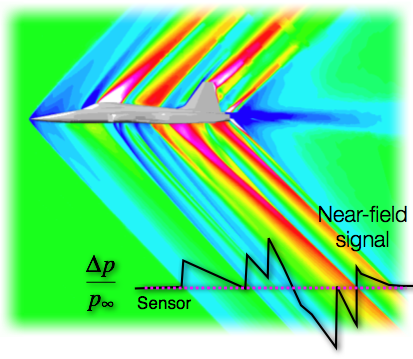 Also
starting with v1.4, you can extract data along any
number of discrete points or lines within the
computational domain. Need to do a wake survey? Want
to compare with off-body data or irregularly placed
pressure taps? This is by far the most accurate way
of instrumenting
specific locations in the flow field. You
specify point or line sensors using 1-line additions
to the "$__Post_Processing:"
section in input.cntl
and at the end of your run you'll see data files
ID'd using the sensor names "lineSensor<Name>.dat".
Data
from an arbitrary list of point-sensors gets
collected in "pointSensors.dat".
Point sensors can also be used in the the "$__Convergence
His...:" section in input.cntl.
In this case, they work like "strip-chart" recorders
of data at a particular point in the flow. This
allows you to monitor convergence at discrete
off-body locations to help understand what's going
on in your simulation. When used as convergence
monitors, each point sensor produces a "pointSensor_<Name>.dat"
file with the state vector and Cp's as a function of
iteration count.
(top)
What about CGNS?
Good question. There is
currently no CGNS standard for
Cartesian grids, but it is something that we'd very
much like to support and we're working with the CGNS
team to develop this standard. When this is done,
we'll add CGNS support into Cart3D.
Of course The CGNS system already does support
unstructured surface triangulations and we do have
translators for Cart3D surface triangulations (all
types) and CGNS. These were written by the CGNS
team and you should drop a note to CGNS-Support@CGNS.org to get a copy of these
translators.
last
update December, 2024.
|
|


 Also
starting with v1.4, you can extract data along any
number of discrete points or lines within the
computational domain. Need to do a wake survey? Want
to compare with off-body data or irregularly placed
pressure taps? This is by far the most accurate way
of instrumenting
specific locations in the flow field. You
specify point or line sensors using 1-line additions
to the "$__Post_Processing:"
section in input.cntl
and at the end of your run you'll see data files
ID'd using the sensor names "lineSensor<Name>.dat".
Data
from an arbitrary list of point-sensors gets
collected in "pointSensors.dat".