Once you have submitted a dataset for sharing in the NAS Data Portal, you can continue to add, remove, or delete files and/or directories by submitting a dataset change request.
Your request will be reviewed by the Principal Investigator (PI) for your project and by the NAS Data Publication and Discovery team; if approved, the dataset will be updated.
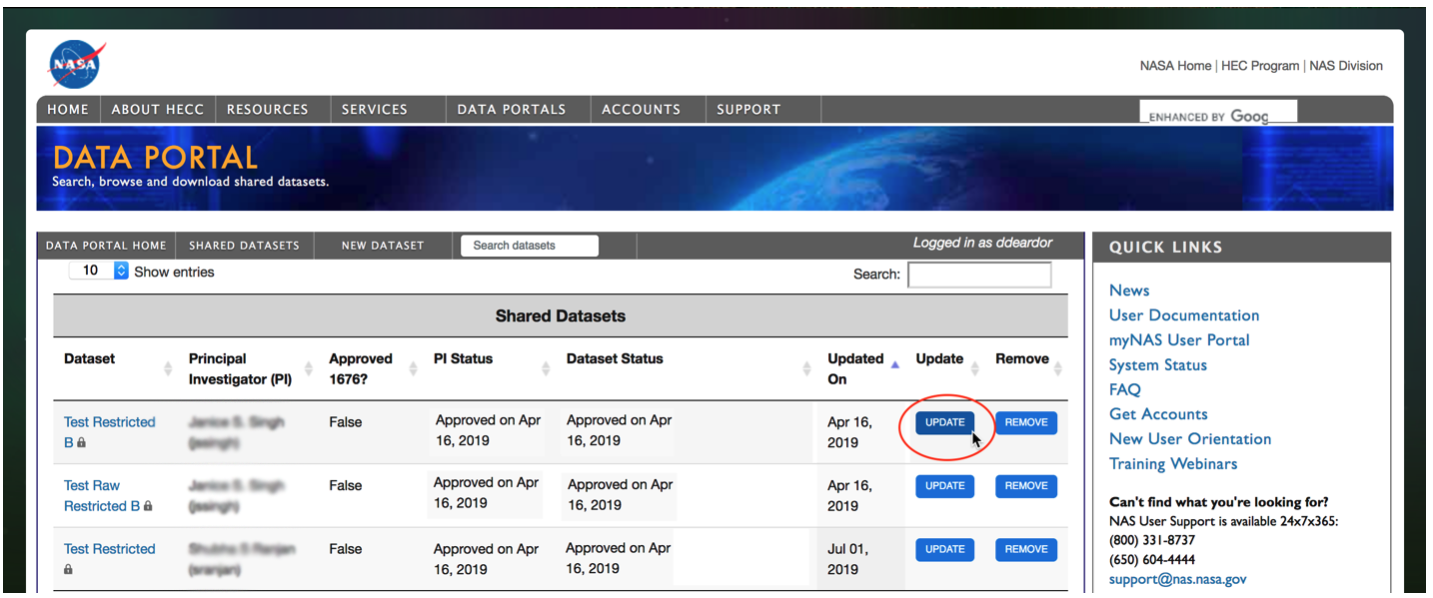
To submit changes, log into the Data Portal. You will see a list of datasets that you have submitted for sharing, as shown above. Click Update for the dataset you would like to update, and a change request form will open. Each field of the change request form is described below:
- Name
- You can edit the name of your dataset. This name will be used to identify the dataset in email notifications.
- Location
- You can edit the primary location of your dataset files. All shared datasets must reside on one of the /nobackup filesystems). Ensure that all of the files are located in one top-level directory under public (for public) or private (for restricted). For example:
- /nobackupp8/username/public/datasetname/
- /nobackupp8/username/private/datasetname
Directory names in and under the top-level directory must not contain any of the following characters:
#$%^&*()+=\[\]:?~'\";)
Note: If it is not feasible to house all of your public dataset files on one filesystem as described above, please list one location in this field, and use the Notes field below to specify the additional locations. The NAS team will contact you to discuss the locations.
- Description
- You can edit your dataset description. Use this field to explain what the data is, how it was generated, what it is used for, and so on.
- Notes
- You can add notes about your dataset. This field can be used to describe additional locations of dataset files, for instance.
- Associated Websites
- You can edit the list of associated websites.
- Delete Dataset
- If you no longer want to share the dataset, you can request that it be deleted from the Data Portal.
- Message for Change
- Provide a short descriptive label for this requested change. The label will be used to identify this change request (for instance, in emails).
- Description of Change
- Describe the dataset change you are submitting. Note which files have been added, removed or changed. This is needed to communicate to the NAS team exactly the which files to update.
Note: You can edit restricted users or tags without PI approval by clicking the Edit Restricted Users or Edit Tags buttons at the bottom of the page. Clicking either button will bring up a new form that you can use to submit these updates.


